
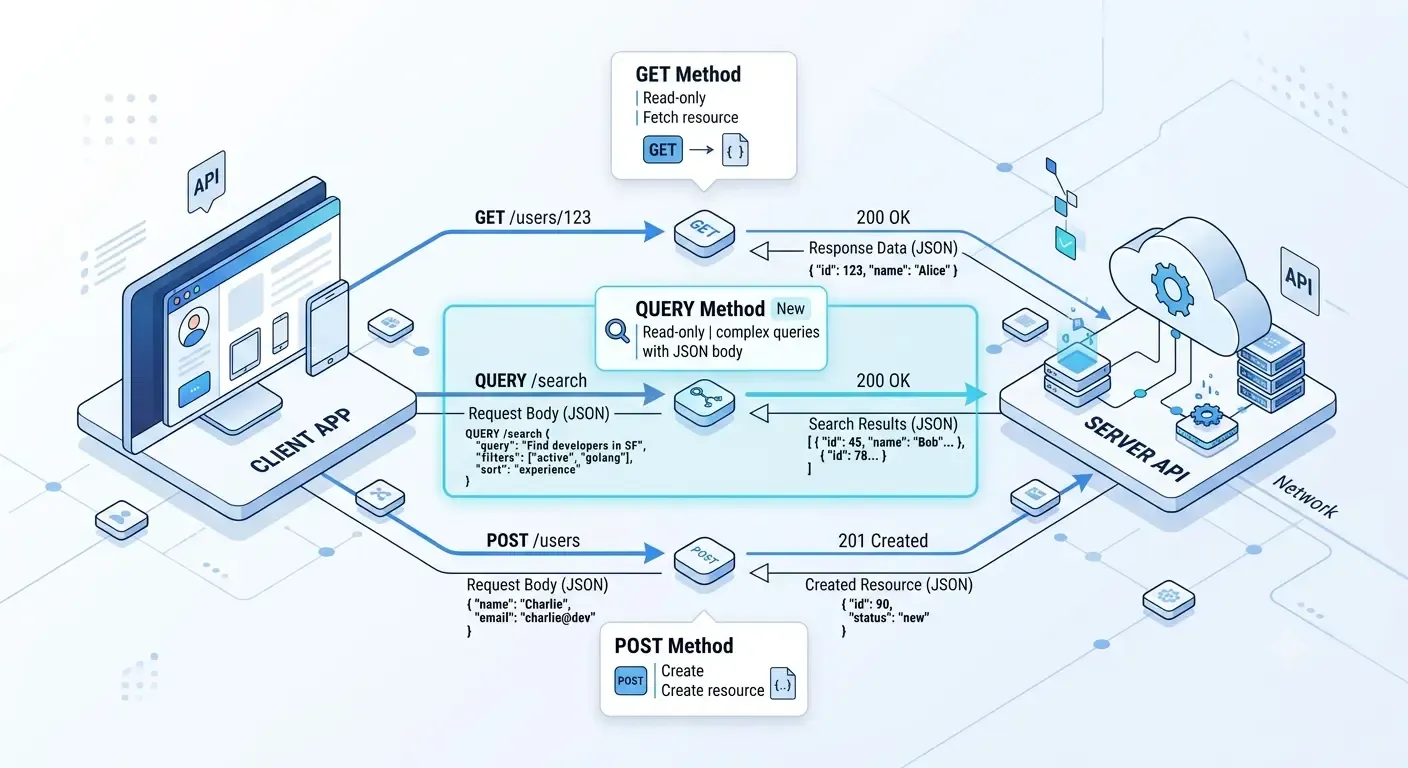
The HTTP QUERY method provides a standardized way to send complex query requests without the limitations of GET URLs or the semantic confusion of POST. Here's everything you need to know.
When building REST APIs, developers have traditionally relied on GET for retrieving data and POST when queries become too large or complex for URL parameters.
However, this creates a problem:
- GET requests shouldn't have large request bodies.
- POST requests imply creating or modifying resources, even when they're only fetching data.
To solve this semantic mismatch, the HTTP working group introduced the QUERY method.
In this article, we'll explore what the QUERY method is, why it exists, and how it improves API design.
What is the HTTP QUERY Method?
The QUERY method is an HTTP request method designed specifically for retrieving information using a request body without implying any modification to server resources.
Unlike GET:
- QUERY allows a request body.
- QUERY is intended for safe, read-only operations.
- QUERY avoids URL length limitations.
Unlike POST:
- QUERY clearly communicates that no resource should be created or updated.
- Clients, proxies, and developers can better understand the request's intent.
Think of it as:
GET with a request body and proper semantics.
Why Was QUERY Introduced?
Modern applications often perform complex searches.
Consider searching products using dozens of filters:
- Categories
- Price ranges
- Brands
- Ratings
- Availability
- Nested conditions
- Sorting
- Pagination
Using GET:
GET /products?category=laptop&brand=Dell&priceMin=500&priceMax=1500&rating=4&availability=true&sort=price
This quickly becomes:
- Hard to read
- Difficult to maintain
- Limited by maximum URL length
- Impossible for deeply nested filters
Developers frequently switch to POST:
POST /products/searchContent-Type: application/json
{
  "category": "Laptop",
  "brand": "Dell",
  "price": {
    "min": 500,
    "max": 1500
  }
}
Although this works, POST technically represents processing or creating something rather than simply retrieving data.
QUERY fills this gap.
Basic Syntax
QUERY /products HTTP/1.1Host: api.example.comContent-Type: application/json
{
  "category": "Laptop",
  "brand": "Dell",
  "price": {
    "min": 500,
    "max": 1500
  },
  "sort": "price"
}
The server returns matching products without modifying any data.
GET vs POST vs QUERY
Feature | GET | POST | QUERY |
|---|---|---|---|
Retrieves data | ✅ | ✅ | ✅ |
Safe operation | ✅ | ❌ (not guaranteed) | ✅ |
Idempotent | ✅ | Usually No | ✅ |
Request body | Not standardized | ✅ | ✅ |
URL length limitation | Yes | No | No |
Best for complex filtering | ❌ | Sometimes | ✅ |
Example: Product Search
Instead of:
GET /products?category=Laptop&brand=Dell&priceMin=500&priceMax=1500&sort=price&page=3
You can write:
QUERY /products
{
  "filters": {
    "category": "Laptop",
    "brand": "Dell",
    "price": {
      "min": 500,
      "max": 1500
    }
  },
  "sort": "price",
  "page": 3
}
This is:
- Easier to extend
- Cleaner
- More readable
- Better for nested objects
Another Example: Analytics API
Suppose you need sales reports.
Instead of a massive URL:
GET /analytics?from=2024-01-01&to=2024-12-31&groupBy=month&country=US®ion=California&device=mobile
Use QUERY:
QUERY /analytics
{
  "dateRange": {
    "from": "2024-01-01",
    "to": "2024-12-31"
  },
  "groupBy": "month",
  "filters": {
    "country": "US",
    "region": "California",
    "device": "mobile"
  }
}
Advantages of QUERY
1. Supports Large Queries
URLs no longer become excessively long.
2. Better Semantics
POST suggests:
- create
- update
- process
QUERY clearly means:
"I'm only asking for information."
3. Complex JSON Payloads
Supports nested filters naturally.
Example:
{
  "filters": {
    "price": {
      "min": 100,
      "max": 1000
    },
    "categories": [
      "Electronics",
      "Gaming"
    ]
  }
}
4. Easier API Evolution
Adding new filters doesn't require awkward query parameters.
5. Better Readability
Large JSON payloads are much easier to understand than extremely long URLs.
Is QUERY Safe?
Yes.
Like GET:
- it should not modify resources
- it should only retrieve information
- repeated requests should produce the same result (assuming data hasn't changed)
That makes QUERY both:
- Safe
- Idempotent
Can QUERY Be Cached?
Potentially yes.
However, caching support depends on:
- clients
- browsers
- proxies
- CDNs
Since QUERY is relatively new, caching behavior may vary across implementations. Servers should provide appropriate cache-related headers if caching is desired.
Browser Support
This is where things get interesting.
Most browsers currently do not expose QUERY as a built-in option for HTML forms or JavaScript APIs like fetch() without additional support.
Similarly:
- many web frameworks
- reverse proxies
- API gateways
- load balancers
may not yet recognize QUERY requests.
Adoption will improve over time as the HTTP ecosystem evolves.
Server Example
Pseudo-code:
app.query("/products", (req, res) => {
    const filters = req.body;

    const products = searchProducts(filters);

    res.json(products);
});
Instead of pretending the request is a POST, the route explicitly communicates that it is a read-only query.
When Should You Use QUERY?
QUERY is an excellent choice when:
- Complex filtering is required.
- Request payloads exceed practical URL lengths.
- The operation is read-only.
- You want accurate HTTP semantics.
- Your infrastructure supports the QUERY method.
When Should You Continue Using GET?
GET remains the best choice for:
- Fetching a single resource
- Simple filtering
- Pagination
- Public APIs
- Requests that benefit from widespread browser and proxy support
Example:
GET /users/42
or
GET /products?page=2
When Should You Use POST Instead?
POST is still appropriate when you are:
- Creating resources
- Uploading files
- Triggering actions
- Running operations with side effects
- Processing commands
Examples include:
POST /ordersPOST /paymentsPOST /loginPOST /upload
Current Adoption Status
The QUERY method is a relatively recent addition to the HTTP specification. While it provides clearer semantics for read-only operations with request bodies, support across clients, frameworks, browsers, and intermediaries is still evolving.
For most production APIs today, using GET for simple retrievals and POST for complex search operations remains the most compatible approach. As tooling and infrastructure mature, QUERY has the potential to become the preferred choice for complex, safe retrieval requests.
Conclusion
The HTTP QUERY method addresses a long-standing gap in HTTP semantics by providing a dedicated, safe way to perform complex read-only queries using a request body. It combines the safety and intent of GET with the flexibility of POST, making API designs more expressive and easier to understand.
Although ecosystem support is still catching up, QUERY represents an important step toward cleaner, more semantically correct web APIs. If you're designing modern APIs and your infrastructure supports it, it's worth considering QUERY for advanced search and filtering scenarios.
Frequently Asked Questions (FAQ)
Is QUERY replacing GET?
No. GET remains the standard for retrieving resources with simple parameters. QUERY complements GET by handling more complex retrieval requests.
Is QUERY better than POST for searches?
Yes, when the operation is purely read-only. QUERY more accurately expresses the intent of fetching data without modifying server state.
Does QUERY allow a request body?
Yes. Supporting a request body is one of the primary reasons the QUERY method was introduced.
Is QUERY supported everywhere?
Not yet. Support is still emerging across browsers, frameworks, proxies, and API gateways, so verify compatibility before adopting it in production.